
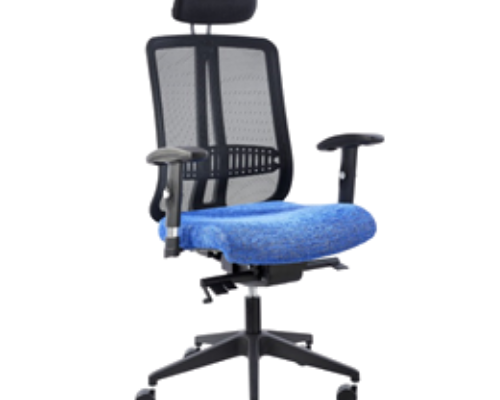
Your team spends around eight hours a day in their office chairs, so the right chair matters more than almost any other piece of office furniture. A good ergonomic chair helps reduce back and neck strain, keeps people comfortable and focused, and lasts for years. This guide covers what to look for when buying office chairs for your business.
Why Ergonomic Office Chairs Matter
Sitting in a poorly adjusted chair for hours leads to slouching, lower back pain, stiff shoulders and fatigue. An ergonomic chair is designed to adjust to the person sitting in it, so it supports a healthy posture instead of fighting it. Comfortable staff take fewer breaks to stretch out aches, and quality chairs need replacing less often.
The 6 Adjustments to Look For
1. Seat height
A gas-lift height adjustment is essential. Set the seat so your feet rest flat on the floor, your thighs are roughly parallel to the floor and your knees are bent at about 90 degrees. If you share chairs or desks, check the height range suits both shorter and taller staff.
2. Seat depth
When you sit right back, there should be a gap of about two to three fingers between the front edge of the seat and the back of your knees. Some chairs have a seat slider that moves the seat forward or back, which is useful when different people use the same chair.
3. Lumbar support
Your lower back curves inwards. Good lumbar support fills that curve so you don’t slump. Look for a backrest with built-in lumbar shaping, or better still, adjustable lumbar support that moves up and down.
4. Backrest tilt and tension
Being able to lean back slightly takes pressure off your spine. A tilt lock lets you fix the backrest upright for typing, while tension control sets how easily it reclines. Synchro-tilt mechanisms move the seat and backrest together for more natural support.
5. Armrests
Height-adjustable armrests let your elbows rest at about desk height with your shoulders relaxed. Armrests that are too high push your shoulders up; armrests that are too wide or fixed can stop you pulling the chair close to the desk. For typing-heavy roles, armless typist chairs are also an option.
6. Headrest
A headrest is a nice extra on high-back chairs, especially if you recline during calls or reading, but it is not essential for most desk work.
Mesh, Fabric or Leather?
- Mesh: breathable and cooler during long days, with a modern look. Popular for open-plan offices.
- Fabric: soft and comfortable, available in many colours, but harder to clean than leather.
- Leather and PU: a classic executive look and easy to wipe clean, but warmer to sit on for long periods.
Choosing the Right Chair for Each Role
- Operator and typist chairs: for admin staff, call centres and reception. Look for adjustable height, lumbar support and a sturdy base.
- Ergonomic mesh task chairs: for staff at a computer most of the day who need the full range of adjustments.
- High-back executive chairs: for managers and directors, combining comfort with a professional look.
- Visitor and boardroom chairs: for meeting rooms, waiting areas and boardrooms. Comfort and appearance matter more than adjustability.
- Heavy-duty 24-hour chairs: for security control rooms and shift work, built for continuous use.
Base, Castors and Build Quality
A five-star base is the most stable design. Check the castors suit your floors: harder castors roll better on carpet, while softer castors protect tiles and wooden floors. Ask about the chair’s weight rating and warranty, and check that replacement parts such as gas lifts are available. A good gas lift can be replaced instead of throwing away the whole chair.
Setting Up Your Chair Correctly
- Adjust the seat height so your feet are flat and knees at about 90 degrees.
- Sit right back and set the seat depth and lumbar support.
- Set the armrests so your elbows rest at about desk height.
- Pull the chair close to the desk so you are not reaching forward.
- Place your monitor about an arm’s length away with the top of the screen at or slightly below eye level.
Tips When Buying Office Chairs for Your Business
- Sit in the chair before buying in bulk if you can, and let a few staff try it.
- Buy the same range for a team so your office looks consistent and spares are easy to source.
- Match the chair to how many hours a day it will be used, not just the price.
- Ask about warranty, delivery and assembly before you order.
Frequently Asked Questions
What makes an office chair ergonomic?
An ergonomic office chair adjusts to fit your body: seat height, seat depth, lumbar support, armrest height and backrest tilt. The goal is to keep your feet flat, your lower back supported and your shoulders relaxed while you work.
Is a mesh or leather office chair better?
Mesh backs are breathable and stay cooler during long days, which suits warm offices. Leather and PU chairs look more executive and are easy to wipe clean, but they hold more heat. Fabric chairs sit in between and come in the widest range of colours.
How high should my office chair be?
Set the seat so your feet rest flat on the floor, your thighs are roughly parallel to the floor and your knees are bent at about 90 degrees. Then adjust your desk position or monitor so your elbows sit at about desk height.
What type of office chair is best for a call centre?
Call centres and admin teams usually do best with adjustable operator or typist chairs with good lumbar support. For control rooms and 24-hour operations, choose heavy-duty chairs built for continuous use.
Need Office Chairs for Your Office?
Office Furniture Direct supplies ergonomic mesh chairs, executive chairs, operator and typist chairs, and visitor chairs to businesses across Gauteng, including Johannesburg, Pretoria, Sandton, Midrand and the East Rand. Browse our office chairs or ask for a free quote. Call 011 827 2625 or email [email protected].
